Account setup & integration.
Joining XI Royale shouldn't feel like filling out tax documents. We provide an effortless setup flow that syncs your active Fantasy Premier League squad in seconds.
The WhatsApp Fast-Track.
Skip the forms entirely. Send a single pre-filled message to our automated WhatsApp desk. Our bot creates your account, verifies your phone line, and links your official FPL ID directly through chat in under 30 seconds.
The Web Portal.
If you prefer browser-based registration, you can create your account directly through our responsive web app.
Access Registration
Navigate to the XI Royale web application and click Register at the bottom of the screen.
Enter Kenyan Mobile Number
Provide your active Safaricom phone number for automated Daraja M-Pesa deposits and instant winnings settlement.
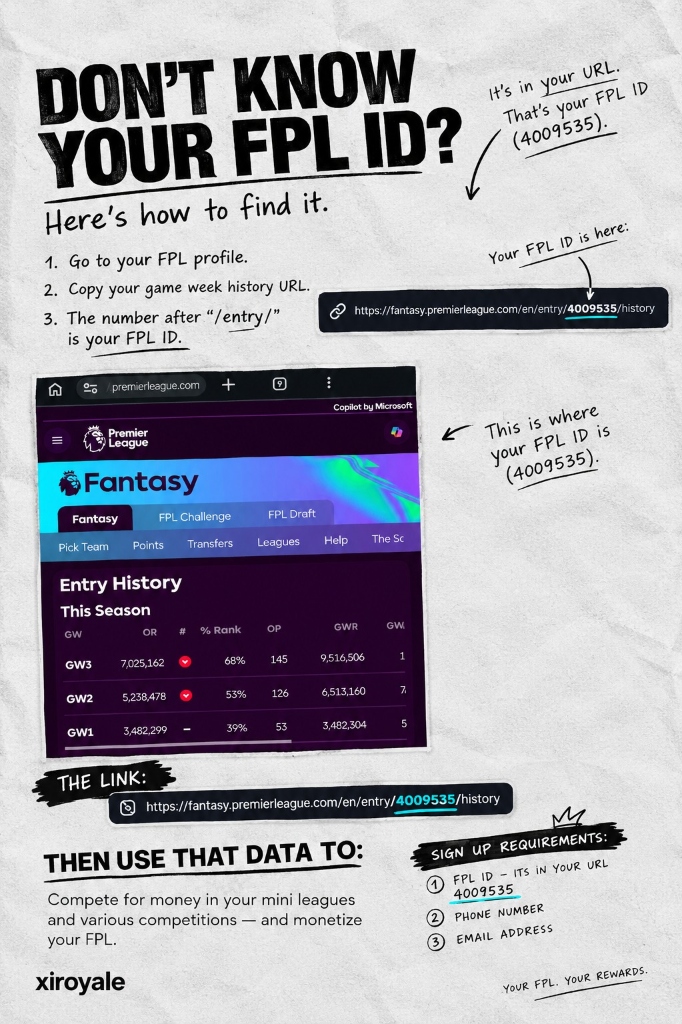
Input Official FPL Manager ID
Enter your numeric FPL ID so our data pipeline can bind to your official gameweek scores automatically.
Secure Password & Instant Activation
Confirm your credentials. Your account is activated instantly without waiting for manual verification queues.
How to find your FPL Manager ID.
Your FPL Manager ID is the permanent numeric identifier assigned to your team by the Premier League.
Log in to your squad at fantasy.premierleague.com.
Click the "Points" tab or "Gameweek History" link.
Look at your browser URL bar. The digits right after /entry/XXXXXX/ are your FPL Manager ID.